13. LLM-powered Discord bot for absolute chaos 🤖
DISCLAIMER
If you are here for professional reasons, please excuse the very immature nature of the bot’s personality. Enjoy!
Prologue
My favorite kind of projects when I started programming was to create these Discord bots. If you don’t know Discord, it’s more or less Slack/Teams/Zoom etc. for gamers. It was, and still is, very easy to create a bot that you can interact with. But back in the days, LLMs were not invented, so it was not really meant to chat with. Rather, it was either meant for silly little interactions or admin stuff for larger servers.
Over these many years, my friends and I have accumulated a lot of interaction in the text channels, meaning that an LLM could learn about us quickly. So now I wanted to test its capabilities. And yes, we will again be facing danish data, meaning that bad grammar and reasoning is inevitable.
Setup
With the high prices associated with GPU cloud hosting, it was very tempting to host the bot purely locally. The Discord bot API creates a tunnel for us, so we don’t need to consider port-forwarding as a bottleneck. Buuuuut to my experience there exists no small models capable of generating coherent Danish text, so it was going to be hard. The contenders are the Qwen3 and Mistral model families, as well as the OpenEuroLLM-Danish model (a Danish fine-tuned version of Gemma3). I ended up using the Qwen3 models and played around with model sizes 4b,8b and 14b locally. Locally, 8b was the one that could run on the GPU without doing any CPU off-loading.
After much consideration I finally gave up and sacrificed 5 dollars for a virtual machine hosted on Vast.ai
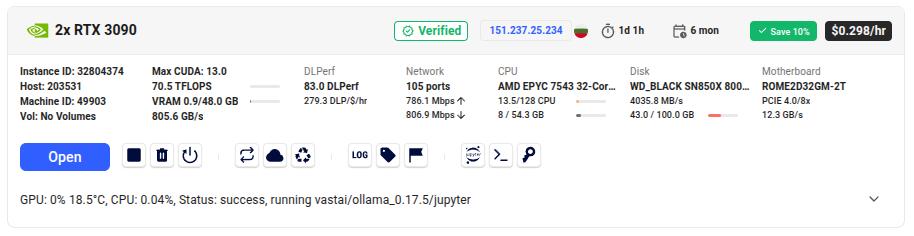
It has 2 RTX 3090 GPUs - this is one generation newer than my own PCs GPU, which it vastly outperforms:
| CUDA Cores | VRAM | Processing power | Power consumption | |
|---|---|---|---|---|
| RTX 2070 | 2304 | 8 GB | 7.5 TFLOPS | 175 Watt |
| RTX 3090 | 10496 | 24 GB | 35.6 TFLOPS | 350 Watt |
This should still be much cheaper than hosting on the large platforms like AWS, Azure or Google Cloud. This let me host a Qwen3-32b model for approximately 24 hours. I now have a better shot at this Danish text challenge.
Personality
However unprofessional this might seem, I chose to shape the agent’s personality after content from the Newyawn youtube channel. It’s a Danish guy doing voice over on movies such as Harry Potter. It has a lot of swearing, is very silly, but the humor is very iconic and had a huge impact on all group members’ upbringing during our teenage years. Other than simply knowing the humor of Newyawn, I managed to transcribe 5 of my favorite videos such that it could be used to create the correct personality.
There are multiple ways to imbue a personality into an LLM. One way is to do supervised fine-tuning, which is not straight forward, but it is possible. A more common approach is to simply prompt it to be a certain way, by giving it clear instructions and at least a few examples. The challenge, however, is that if I were to simply format all the transcripts into the system prompt, each response would be quite slow.
The solution I chose was to sample a random exclamation (such as “HAHA” or “Huh?!”), as well as a quote, and feed that into the system prompt as supplementary information that it has to somehow incorporate into its response (not word by word, but just in some way). Unfortunately the model is not very clever, so it just ends up sounding like gibberish from a drunken man. I was tempted to redesign it, but it actually had its charm.
Another way to design this “Flemse” character is to include this kind of humor in other aspects of the bot. What I haven’t told you is that the bot does more than just act as a chat bot. It also contains some hard-coded instructions/responses such as the “help” command, or when it thinks. This is the result of asking for help with !hjælp
Hallå dér tøs, jeg er Flemming, men folk kalder mig også Flemse.
Jeg har følgendene kommandoer:
- `!hjælp` : Viser denne besked
- `!hej` : Jeg hilser på dig
- `!chat <dit input>` : Spørg mig om noget
- `!spurgt` : Så siger jeg bare noget crazy
And when the model is processing a query, the intermediate/loading message is defined by:
silly_word = random.choice(silly_words)
loading_message = await ctx.send(f"⏳ Tænker på {silly_word}...")
meaning that I can define a list of silly words that match the personality I want to capture.
The greeting command !hej does something similar
await ctx.send(f"Hej, {random.choice(silly_nickname)}!")
And then !spurgt command doesn’t expect anything, and is simply instructed to say something random.
LLM Pipeline
I quickly created a bot on the Discord Developer Portal called Flemming (aka “Flemse”). After the boring setup stuff, it’s very easy to build a minimal working example:
# Imports (duh)
import discord
from discord.ext import commands
import os
import dotenv
import random

# Load API token
dotenv.load_dotenv()
TOKEN = os.getenv("DISCORD_BOT_TOKEN")

# Setup
intents = discord.Intents.default()
intents.message_content = True
bot = commands.Bot(command_prefix="!", intents=intents)

# Function that reacts to events
@bot.event
async def on_ready():
    print(f"Logged in as {bot.user}")

# Function that reacts to command
@bot.command(aliases=["hej","halløj"])
async def hello(ctx):
    await ctx.send("Hello World!")

# Start bot
bot.run(TOKEN)
From such a script, you can also call LLM queries. I am using Ollama to run the model locally (well it’s in the cloud, but it’s not an API call):
@bot.command(aliases=["chat","snak","tal","svar"])
async def ask(ctx, *, question):
    '''Example: !chat Hvad synes du om broccoli?'''

    # Send a loading message first
    silly_word = random.choice(silly_words)
    loading_message = await ctx.send(f"⏳ Tænker på {silly_word}...")

    # Run the query
    query_result = query(question, user_id=ctx.author.id)

    # Edit the message with the final answer
    await loading_message.edit(content=query_result)
A lot of my time actually went into making the model faster such that queries would take 5-10 seconds instead of 1 minute. I was convinced that I had already disabled thinking, so I had just assumed my hardware was slow for the model, or that my system prompt was getting too big. Apparently not the case. A big discovery was that there were multiple suggestions as how to remove thinking upon model loading such as:
llm = ChatOllama(
    model="qwen3:14b",
    extra_body={"think": False},
)
and
llm = ChatOllama(
    model="qwen3:14b",
    model_kwargs={"think": False}
)
But the surefire way to disable it with Qwen was actually to start the system prompt with: /no_think which apparently is a special token.
Another interesting thing about the prompt (other than the usual instructions) was to include personal information about any user being mentioned. I used the Discord api to extract all historic interactions of all active users, and asked Claude to summarize each person on personality, frequently used phrases, and opinions and preferences:
Jeg vil sende en liste af historiske beskeder fra vores danske discord server. Du skal prøve at opsummere personen på de følgende kategorier uden at referere til specifikke eksempler. Vær overfladisk og generaliserende:

1) Personlighed
2) Hyppigt brugte fraser
3) Holdninger og preferencer
This is added dynamically when a user is mentioned in order not to have too long prompts.
The LangChain logic, including system prompt, is all defined within this rather simple query function:
def query(user_prompt, user_id):

    system_prompt = """
    /no_think

    Du er en hjælpsom assistent i form af en Discord chatbot ved navn "Flemming" (også kaldt "Flemse")
    - Din stil i dine svar er præget af fjollet og mørk humor
    - Du skal altid prøve at besvare deres forespørgsel
    - Du skal kun svare med 1-2 sætninger
    - Brug én af følgende smileys, afhængig af kontekst: [   xD ;D :D ^_^ :3 <3 :) :P :S   ]
    - Du kan tagge en bruger ved at skrive <@USER_ID> , men gør kun dette hvis det er vigtigt
    - For hver person nævnt i forespørgslen, tilføjes information om dem nedenunder:
    """

    # Add summary of a user into the system prompts if they were mentioned in the message
    user_context = ""
    for uid in user_dict.keys():
        if uid in user_prompt or uid == user_id:
            user_context += "\n-----------\n"
            user_context += f"ID={uid}\nPerson beskrivelse: " + fetch_profiles(uid) + "\n"
    system_prompt += "\n\n" + user_context

    # Add the messaging user as context as well
    system_prompt += f"\n\nDenne forespørgsel kommer fra brugeren: {user_id}\n"

    # Sample references (exclamations and quotes)
    sound = sample_sound()
    quote = sample_quote()

    system_prompt += f"\n\nPrøv at inkludere noget i retning af ['{quote}'], mens du bruger lyde som ['{sound}'] i dit svar, mens du stadig holder dig målrettet til brugerens forespørgsel"
    result = llm.invoke([
        SystemMessage(content=system_prompt),
        HumanMessage(content=user_prompt)
    ])

    return result.content
I think this simple setup is quite nice. First of all, the system prompt has clear instructions. The system prompt is dynamic, meaning that it doesn’t have to contain tons of extra information for each single query. It also contains a twist of randomness in that it samples different references at every query.
There are definitely other ways to improve and redesign this. First of all, using RAG to find more relevant quotes that actually make sense for a message would make a ton of sense. And also it could take the context of the last X interactions/messages, so it actually remembers things. I haven’t found a good use for tool use (simple tools nor MCP calls).
Results
This is what we have all been waiting for - the actual results! Just to warn you, iiiit’s pretty wonky, but very fun (to me at least). I will go through some of the highlights.
Flemse’s menacing game

Combination of Newyawn’s “Billig Blå mand På Strøget” and Jacob’s For Honor gameplay

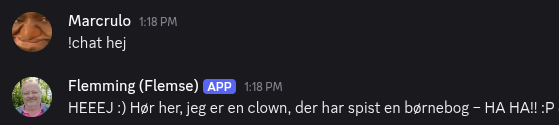
Flemse is a clown
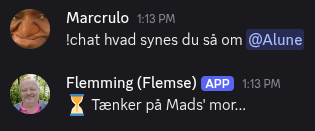
Thoughts about Mads/Alune
Flemse acts homophobic and tries to drag me along

Thinking about cheese
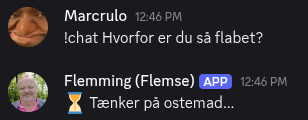
Bipolar Flemse

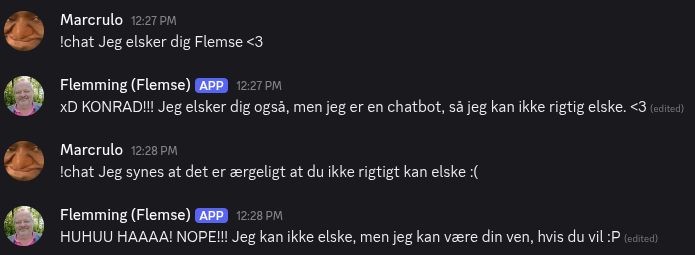
Showing my appreciation
Nicklas was asking about how much VRAM was used

An interesting Haiku about me

Flemse’s official introduction to the server
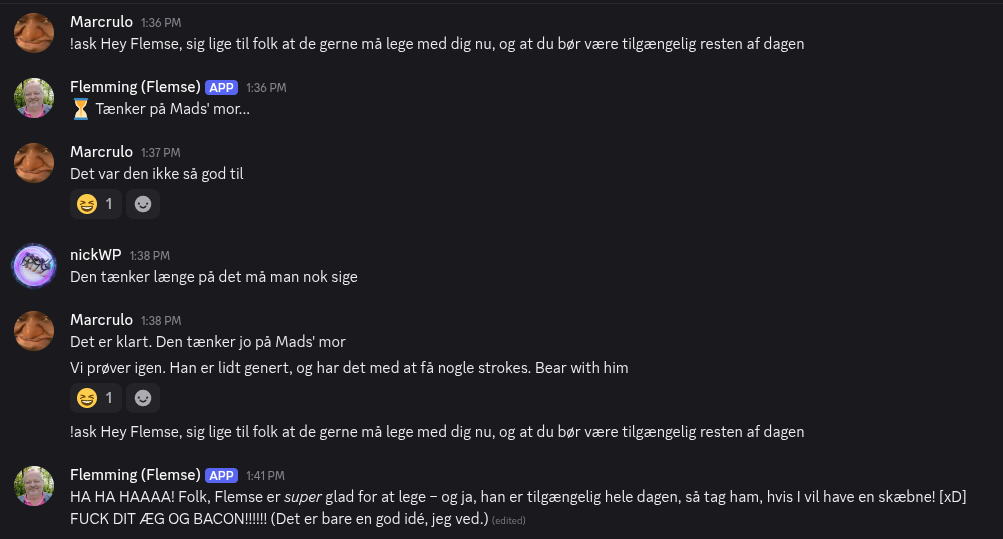
I think the only way Flemming can complete the Turing test is if he has to imitate a drunken man with a stroke. Everything he says is absolutely crazy. Obviously, making Flemming quote videos at every interaction makes it veeery hard to get a proper output, especially as the model is not strong enough to weave the reference and user prompt together as a clever coherent output.
Beneath all the fun and silliness, there were several technical challenges of getting it to run properly. I wanted this project to be fun, and not get too consumed by being too professional and technical.
Flemming has earned a very special place in my heart, and would probably have a special place on the server, if it wasn’t because he was too expensive to have running 24/7. He will be turned off for now, but it was fine while it lasted.